
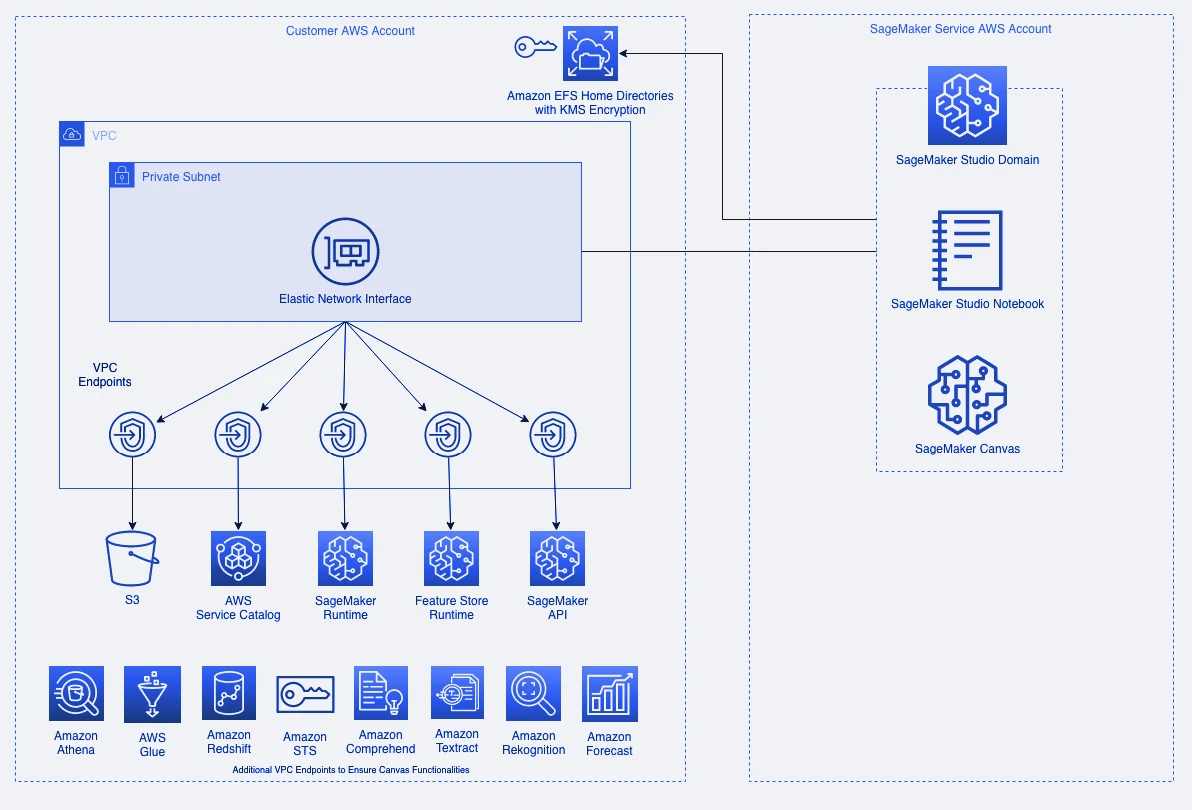
A project where I set up an Amazon SageMaker Studio domain for an organization whose data scientists needed a browser IDE, but where no data, notebook or model artifact was allowed to leave the account. Studio is easy enough to click together in the console. It gets much harder once the requirements are network isolation, central identity, and per-user storage the administrator actually controls.
Everything here is implemented as infrastructure as code in Terraform, so a new environment comes up from one apply instead of from a runbook.
What a Studio domain is
If you have not used one, a SageMaker Studio domain is a managed workspace for data scientists. The usual alternative is that someone asks a platform team for an EC2 instance, waits, gets handed SSH keys, installs their own tooling, and then forgets to turn the machine off.
A domain replaces that with a browser UI. A user picks the application they want, JupyterLab or a VS Code style editor, picks an instance size, and it starts in a couple of minutes. No EC2 to provision, no SSH keys to hand out or rotate, no bastion.
The part that makes it practical is that compute and storage are separate. A user stops their environment when they are done and the compute charge stops with it, but their notebooks, data and installed packages are still there when they start it again, because the work lives on an attached volume rather than on the instance.
The same separation lets people change machines. Stop a space, pick a bigger instance, start it again, and the files are where they were. Someone can explore on a small machine, move to something with a GPU when they actually need to train, and drop back down afterwards, all without copying anything or asking a platform team. That is the main thing a domain buys over handing out EC2 instances.
The domain itself is the container around all of that: the users, their permissions, the network the environments run in, and the storage they share.
No internet access
The domain runs in VPC-only mode. All SageMaker traffic goes through the organization’s own VPC and subnets rather than the AWS-managed VPC the default configuration uses, and nothing has a route to the public internet unless we deliberately provision one.
That one setting drives most of the rest. Without internet access the notebooks cannot reach the SageMaker API, the runtime or S3 unless the VPC has interface and gateway endpoints for each, so we expect subnets that already sit behind that endpoint layer. We also create and attach the domain security group ourselves. In VPC-only mode SageMaker applies that security group to every shared space in the domain, and if it is wrong, collaboration breaks quietly instead of failing loudly.
Containers need the same care. Docker pull and push requests get routed through the service VPC rather than ours, so we pass in a list of trusted AWS accounts and limit ECR operations to those. Without it a user can pull an arbitrary public image into an environment that is otherwise sealed.
Authentication through Identity Center
Users get in through IAM Identity Center. The Studio domain shows up as an application in the SSO portal next to everything else the organization uses, and access is granted by assigning users to that application. Nobody needs IAM credentials.
The permission model here surprises people. A user in the domain inherits nothing from their IAM identity or their Identity Center group. Each user profile has its own execution role, and that role is everything the user can do inside the domain. We create one role per user, so what any single profile can reach is written down explicitly rather than implied by group membership elsewhere.
Storage we control
When you create a domain, SageMaker creates an EFS volume for it automatically. That volume is not in your state, it is not encrypted with a key you picked, and it has no lifecycle policy you wrote. For an environment whose whole point is that the organization controls its own data, that is the wrong default.
So we attach our own EFS instead, encrypted with a customer-managed KMS key, with mount targets in each of the domain subnets, and we leave the auto-created volume unmounted. Storage then lives alongside the rest of the environment with the same encryption and retention rules.
Users are isolated at the filesystem, not by convention. Each one gets an EFS access point with their own POSIX uid and gid, which pins them to a directory they own at permission mode 700. Two data scientists mount the same volume and still cannot read each other’s files.
Mounting our own volume is also what makes the machine-switching above work properly. A user’s home directory is on EFS rather than tied to one space, so it is there in whatever environment they open, on whatever instance size they picked.
Creating the user directories
This is the part I found most interesting, because it is the one thing here that cannot be declared up front.
We can create the EFS volume, and we can create an access point pointing at a directory path. We cannot create the directory. That is a filesystem operation, done by a client that has mounted the volume, not an API call. An access point whose target directory does not exist will not fail at apply time. It fails later, when a user opens their IDE and the mount does not come up.
We close that gap with an event. An EventBridge rule watches CloudTrail for the CreateUserProfile call on SageMaker, and the event invokes a Lambda that mounts the volume through a dedicated root access point and creates the new user’s directory with the right ownership and permissions. Adding a user produces the directory as a side effect, so the two halves stay in sync without anyone remembering to run a script.
What we manage and what users do themselves
There is a deliberate line here between what lives in code and what people click together in the console, and getting it in the right place is most of what makes the environment usable.
Everything durable and security-relevant is in code: the domain, the VPC and security group, the user profiles, the execution roles, the storage and its access points, and the SSO assignment. Those are the pieces that must not drift, and they are the pieces an auditor asks about.
Spaces are not. A space is the thing a user actually works in, which application they want, on what instance size, running which image, with which volume attached. We let users create and start and stop their own spaces from the UI, and we do not version them. Putting them in code would mean a pull request every time a data scientist wants a bigger instance for an afternoon, which defeats the point of a self-service environment.
The same reasoning is why we leave the EFS volume SageMaker creates for itself unmounted. It exists outside our state, so rather than half-manage it, we ignore it and mount our own.
So the guardrails are code and the compute is self-service. Users cannot widen the network, change their own permissions, or reach another person’s files, but they can pick a machine and get to work without asking anyone.
Cost control
Studio charges nothing for the UI. What costs money is the compute behind whatever application a user launches and the storage attached to it. The trap is that a JupyterLab application bills from the moment it starts, even if nobody runs a single cell.
So we turn on idle shutdown, which detects an application with no active kernels or sessions and stops it. Since a user’s work sits on EFS rather than on the application’s own storage, stopping an idle space costs them nothing but the restart. That is what makes it safe to switch on by default rather than leaving it to individuals.
Why it matters
Most of this is not really about SageMaker. It is the same problem every time a team adopts a managed AI service under real data-governance constraints. The service defaults to convenient, the organization needs it to default to contained, and closing that gap comes down to decisions about networking, identity, encryption and storage ownership.
Writing those decisions down as code means the second environment is a copy with different variables, and the security posture of the first one is something a reviewer can read rather than something someone remembers.